Sunday, November 30, 2014

Old Chateau Theater of Rochester MN to SVG - Part III

Using a photograph of one of the window dormers as a guide, I created a vector image of the window detail.  I didn't want to add too much detail, as in N-scale things are pretty tiny as it is.  Though I may go back and try adding detail.


I also started tinkering with the medallion (see yellow below), but I did that freehand sort of (without referencing a photo).  I'll see if I can somehow take the actual pattern of the medallion from a photo.  My SVG front of the building is still pretty rough.  But it's fun to tinker with (and learn how to use) Inkscape.


And for reference what I'm trying to model...


Old Chateau Theater of Rochester MN to SVG - Part II


Dimensions & Math

The best I can estimate is that the old Chateau Theater in Rochester, MN is about 70' wide and 165' deep:


For Inkscape, I'm using a standard 8.5"x11" canvas.  I'm using metric units.  I created a simple spreadsheet in Google Docs to determine the size in mm that the SVG elements need to be when creating the file:


num of feetinches in footscalescale inch/footscale mm/foot
1121600.0751.905

Here's some various angles from satellite.  In addition to the marquee, there will be some angles to deal with such as the slope on the wall/roof where the window dormers are in front.  I may just do flat surfaces at the beginning, and then in subsequent revisions add more detail.


Saturday, November 29, 2014

Old Chateau Theater of Rochester MN to SVG - Part I

Now that winter is fast approaching, I find myself getting back to some of my previous interests... such as wanting to make SVG models of interesting buildings in Rochester, MN.  The idea being to have a PDF that can be printed out on card stock, cut, and glued.   


Just below is the original photo I took looked like (f/10.0, 16mm, ISO100, 1/100sec).  Note all the distortion.  I had to use a wide angle lens.  Using Pixlr Editor (not the Express or O-Matic versions), I was able to use "Edit->Free Distort" and straighten it out as you see above.


I did a very rough/quick prototype in Inkscape of the front.  There's a lot of detail to model and I'll need to get the sizes/proportions done properly.


Aerial shot of the theater.  I think using Google maps I can get a direct above satellite photo to determine the outer dimensions of the building.  Once I have that I can then look at the proportions and figure out exact sizes/dimensions of the model.  I'll have to spend some time tinkering around with the entrance way and fitting up an accurate marquee.


Wednesday, March 28, 2012

Trial Run

This past weekend my six-year old son Sammy helped me put together a trial assembly of the Tomix tram track. The tram track simulates trolley/tram track in a road. As in the design, my sheet of plywood is 48"x32". I ended up putting in some extra track to elongate portions.


This is the plan I worked off of. Conclusion: I need a much bigger sheet of plywood.

Saturday, February 18, 2012

Further Refinements...

I'm beginning to realize that there is only so much you can fit on a 32"x48" board. I was hoping to start right away with T-TRAK modules, but I thought a small board with a continuous run on it might be a nice experiment to start with. So I'm really interested in a make-believe trolley/tram route through a southwest portion of Rochester, Minnesota.

The yellow shows the where the trolley/tram line would be in real life...if it really existed:


Here my current the any-rail layout plan (32"x48"). The blue line approximates the yellow line in the image above.


And I've managed to group the pieces better so it's easier to see the individual components I'll need:

So, based on the pieces needed, I then needed to look at the different sets that Tomix offers its Wide Tram Track with (the pieces are not really available individually, you need to get them in sets with different combinations of pieces in them). I created a Google Documents spreadsheet. On the right are 3 columns...the total individual pieces based on the total quantity of sets I would buy, the total individual pieces I need for the layout, and the last column tells me if I have enough of a given type. If it is a negative number in the last column, I have more than enough. That way I can tinker with different "Total QTY Needed" amounts to see if I can satisfy the last column and spend the least amount of money.

Wednesday, February 15, 2012

Yet another refinement to the layout plan...

Previously, I had come up with this layout. But I didn't like the blue tram track section to the left of the Plummer House/Pill Hill, as it is more curved in real life (well, minus the imaginary tram line).

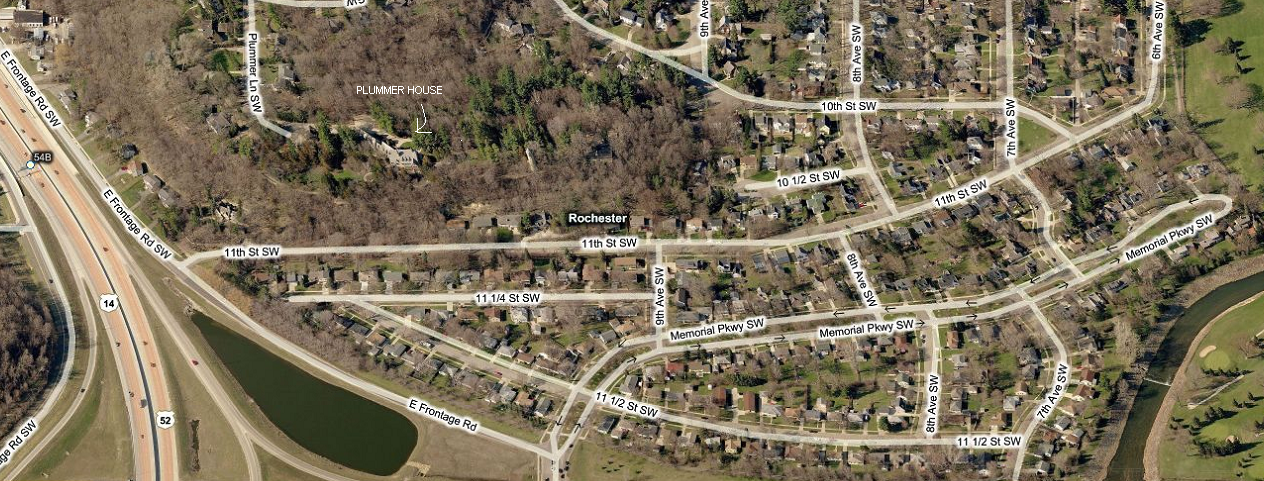
See the frontage road kind of curves around it:


So I played around and came up with this:

Update...

I've been playing around layout software and have decided for the time being make a 48"x32" layout for now. Here are the images of where I currently am at.


Here's an aerial view of the location to be modeled:


The blue lines is where the imaginary tram lines
would go. The dotted line is a tunnel underneath Pill Hill.


Using AnyRail software, the blue (Tomix Wide Tram Track) is the tram line
that attempts to follow the imaginary lines I put in the maps above...


Here's another view, but with Pill Hill showing
where the tunnel would be.